Gift vouchers
Let customers buy prepaid credit to spend on bookings at your fields, for themselves or as a gift. You choose the amounts and how long vouchers last, and the money reaches your Stripe balance when the voucher is bought.
A gift voucher is prepaid credit a customer buys from you and spends on bookings at your fields, for example a £50.00 birthday present for a friend with a dog.
The customer pays up front, the voucher arrives by email with a code like PAD-4PPK-HWMB, and the balance can be spread over as many bookings as they like until it runs out or expires.
Vouchers bring in money before the bookings happen and reach people who have never heard of your field, because the person who books is often not the person who paid.
Where to find them
Section titled “Where to find them”Go to Organisation in the top bar, then Vouchers in the side menu. On a phone the menu is a row of pills under the Organisation heading, so scroll it sideways if you cannot see Vouchers straight away.
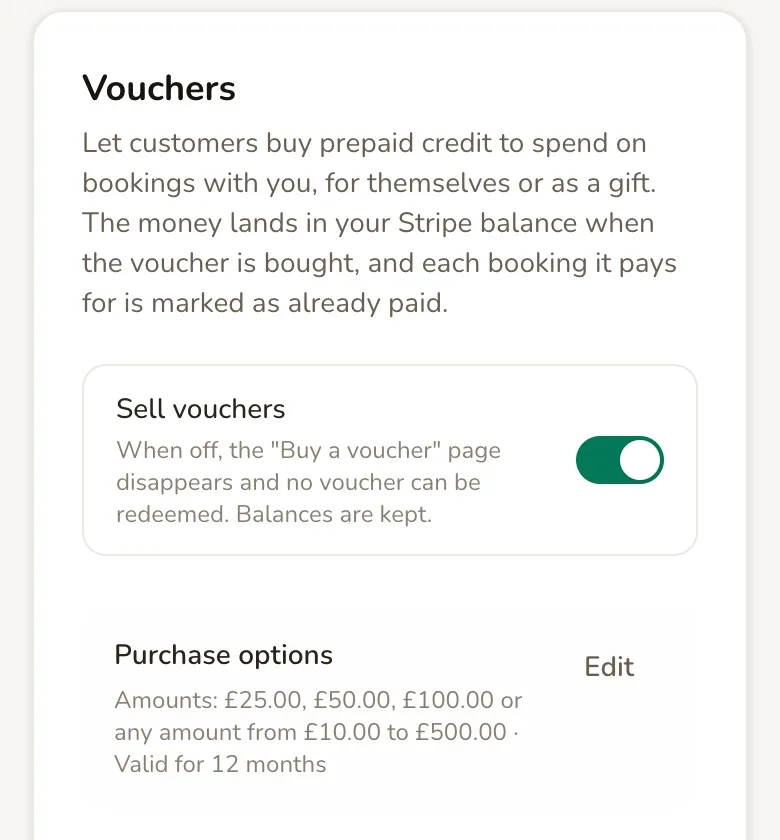
Sell vouchers is the master switch. When it is on, customers can buy vouchers from your booking pages and spend them at checkout. If it is off on your account, tap it to switch it on.
Vouchers are paid for by card, so customers can only buy them once your Stripe setup is complete. Until then the page shows a reminder with a link to finish it.
Choose the amounts and how long vouchers last
Section titled “Choose the amounts and how long vouchers last”Purchase options shows what customers can buy. Tap Edit to change it.
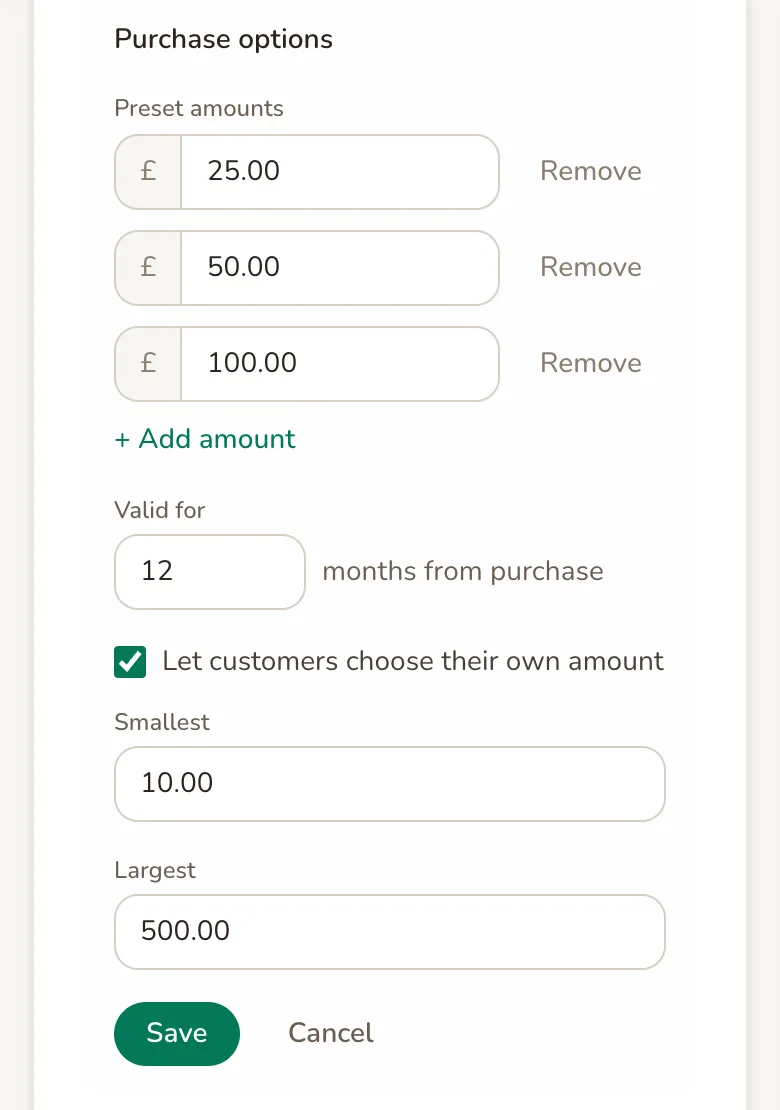
Preset amounts are the buttons customers pick from. You can have between one and six. Tap + Add amount for another, or Remove next to one you no longer want. Paddli sorts them from smallest to largest and drops any duplicates when you save.
Valid for is how many months a voucher can be spent for, counted from the day it is bought. Choose anything from 1 to 60 months. The expiry date is fixed on each voucher when it is bought, so a change here only applies to vouchers bought afterwards.
Let customers choose their own amount adds an Other button, so a customer can type any amount between your Smallest and Largest. Untick it to offer only your preset amounts.
Tap Save and the new options show on your voucher page straight away.
How customers buy a voucher
Section titled “How customers buy a voucher”Every booking page for your fields shows a Gift vouchers strip, which reads Treat someone to time on the field. It appears above the calendar, including on booking forms embedded on your own website. Your organisation’s booking page has a Buy a voucher button, and if you have your own Paddli website its menu has a Vouchers link.
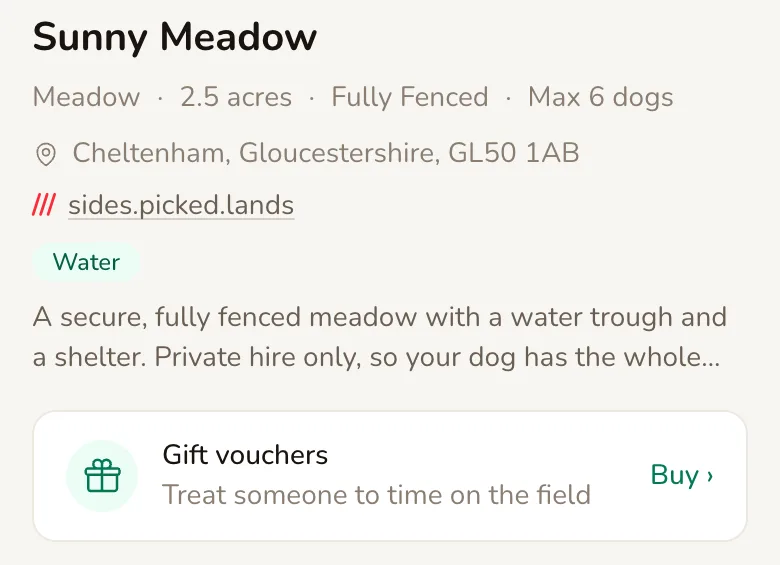
They all lead to your Gift vouchers page. The customer chooses an amount, and if it is a present they tick This is a gift and add the Recipient’s name, Recipient’s email and an optional Message.
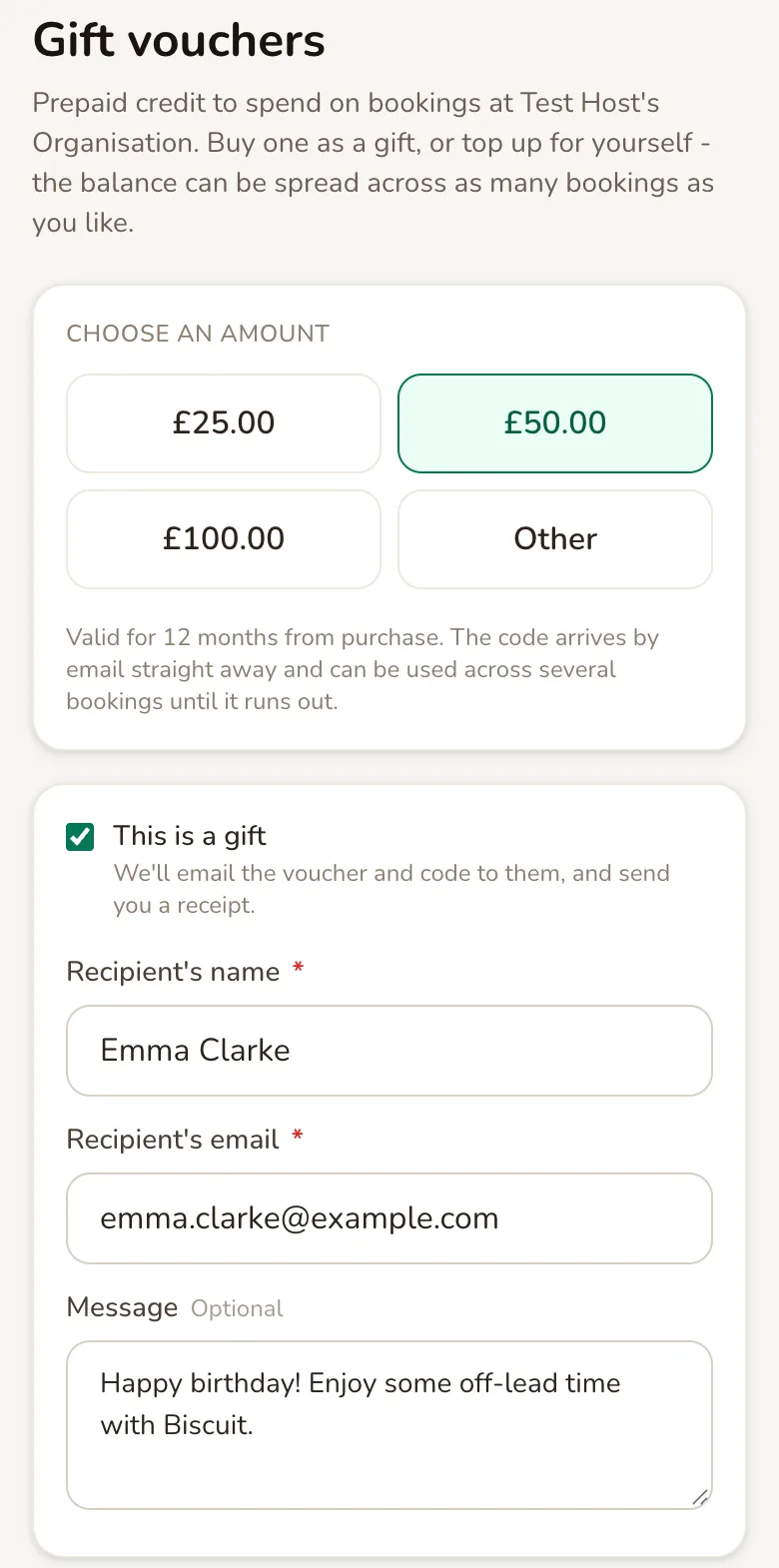
Below that they enter their own name and email and pay by card, or with a wallet such as Apple Pay or Google Pay where their device offers one. The button shows the amount, for example Buy voucher · £50.00.
There is no option to send the voucher on a later date. It is emailed as soon as the payment goes through, so a customer buying for a birthday may prefer to send it to themselves and pass the code on.
What the customer gets
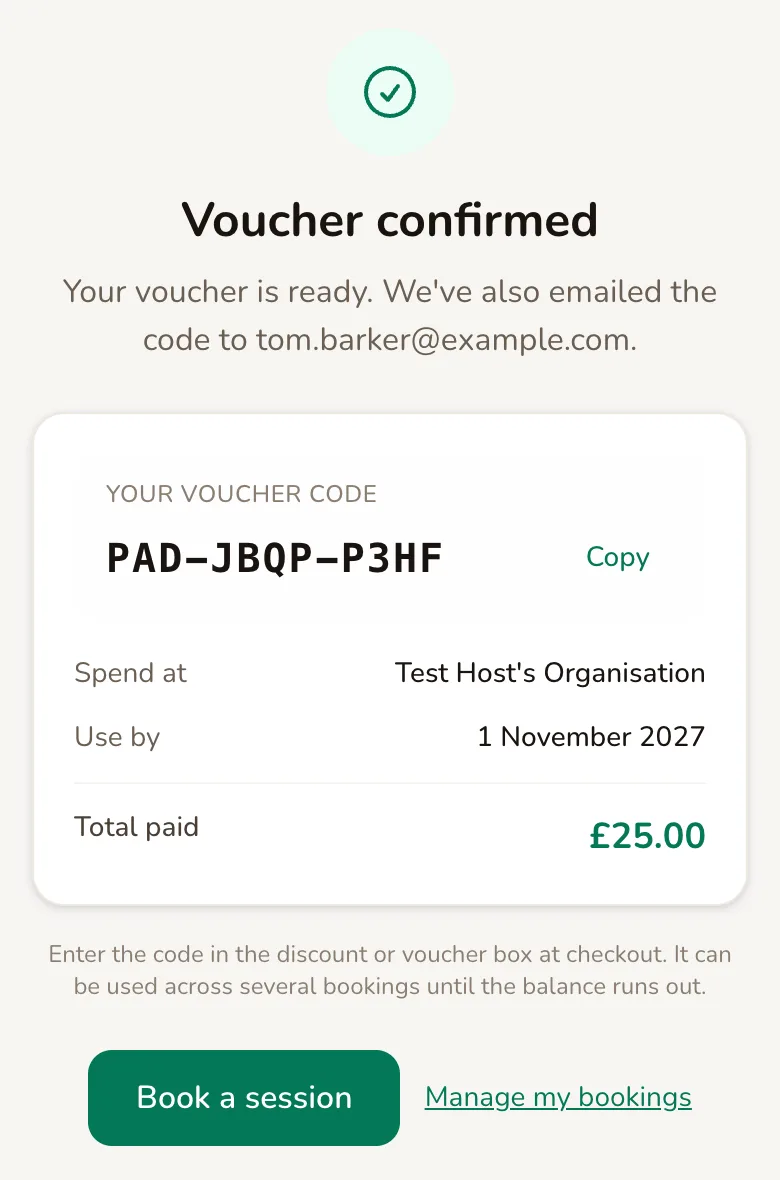
Section titled “What the customer gets”After paying, a customer who bought for themselves sees Voucher confirmed with their code and a Copy button. A customer who bought a gift sees Gift voucher sent instead, and the code goes only to the recipient.
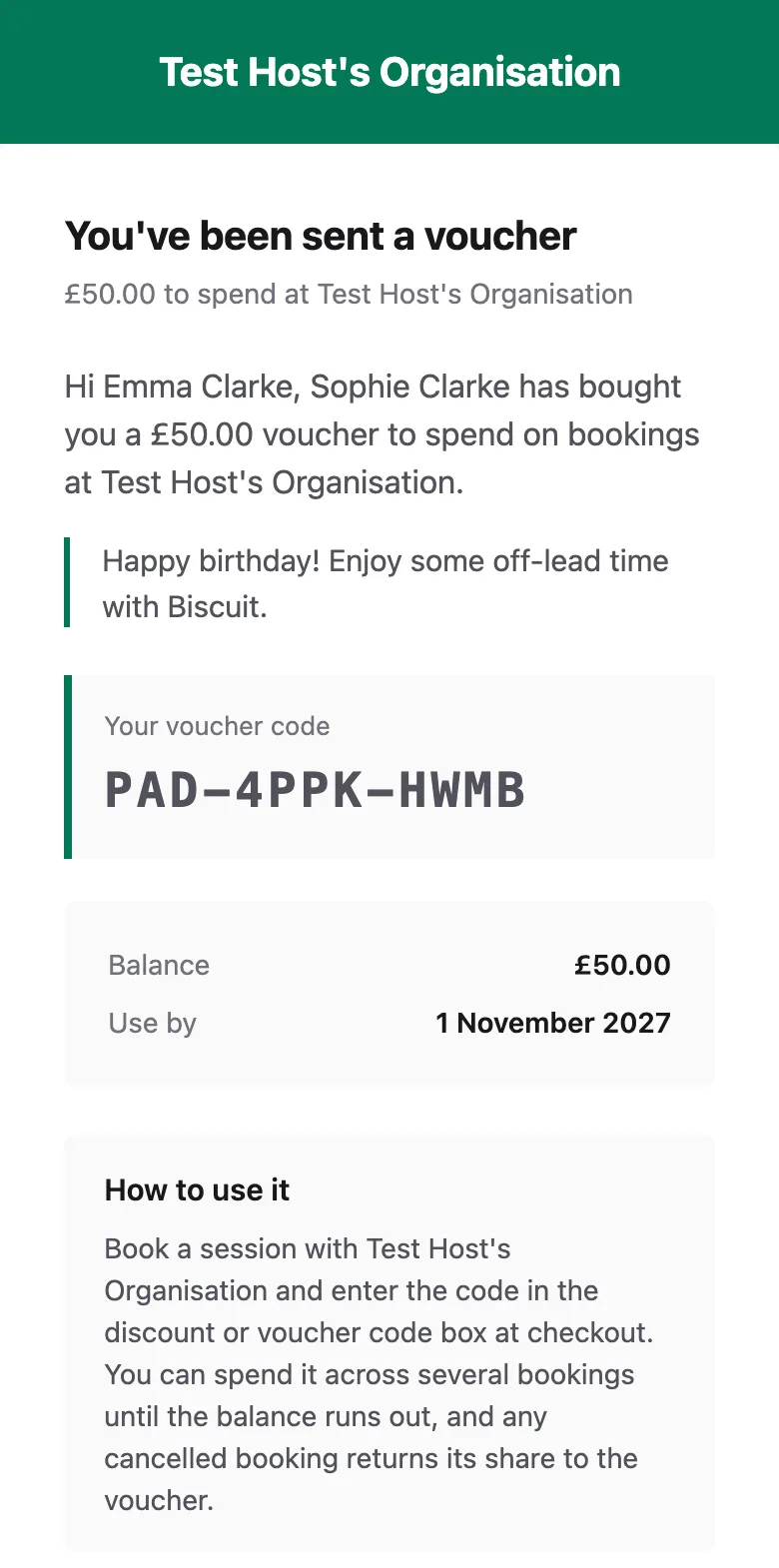
The voucher arrives by email straight away. A gift recipient gets an email saying who it is from, with the message, the code, the balance, the Use by date and a Book a session button. The buyer gets a receipt, which does not include the code.
Vouchers are emailed, not posted or attached as a PDF. The customer can also find their voucher and its balance under Your Vouchers when they sign in to manage their bookings.
You get a Voucher sold email for every voucher bought, with a View vouchers button.
Spending a voucher at checkout
Section titled “Spending a voucher at checkout”When a customer books, the summary shows Have a discount or voucher code? if you also use discount codes, or Have a voucher code? if you only sell vouchers. They enter the code and tap Apply. Capital letters, spaces and dashes do not matter.
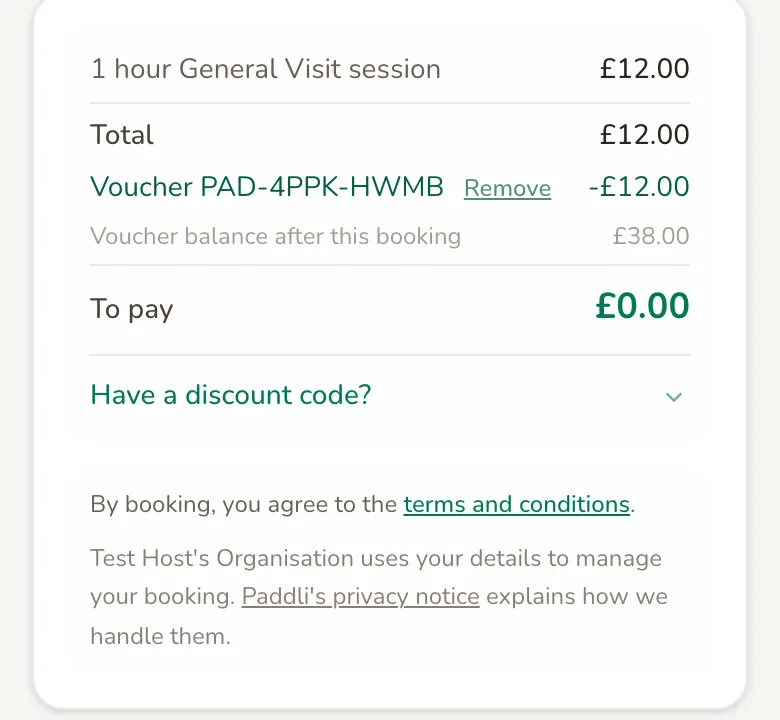
The summary shows the voucher’s share, the Voucher balance after this booking and what is left To pay.
- The voucher covers the whole booking. The customer books without entering card details, using a Book · £0.00 button, and the rest stays on the voucher.
- The voucher covers part of it. The customer pays the rest by card. If the amount left would be too small for a card payment, the voucher covers it too.
- A discount code as well. The customer can still add one after the voucher. The discount comes off first and the voucher pays what is left.
Anyone with the code can spend it, and it works on every field you run. It only works with you: a voucher bought from another host cannot be used at your fields.
If the code cannot be used the customer sees why, for example That voucher has expired. or That voucher has no balance left.
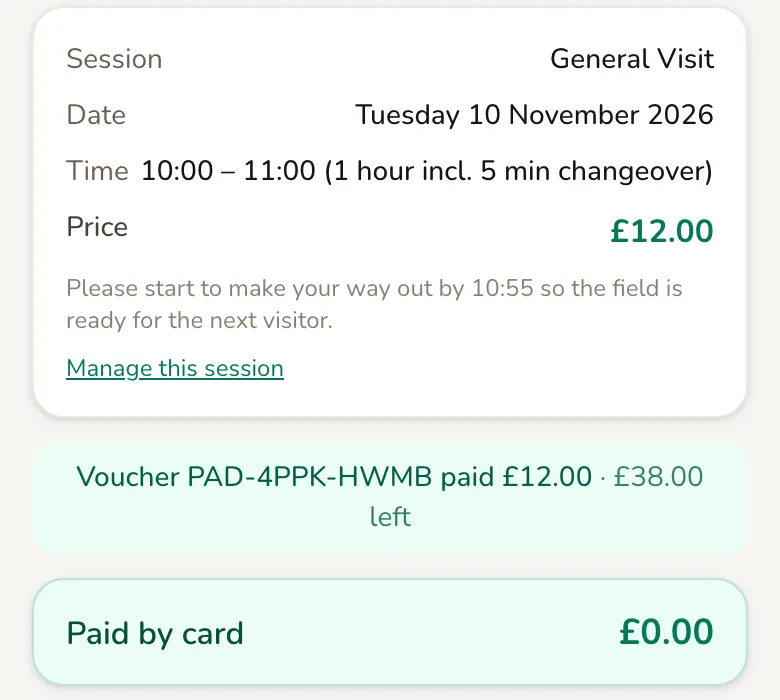
The booking confirmation shows how much the voucher paid and what is left on it.
Keep track of vouchers
Section titled “Keep track of vouchers”Vouchers sold on the Vouchers page lists every voucher, newest first, with its code, what is left of the original amount, who bought it, who it was for and when it expires.
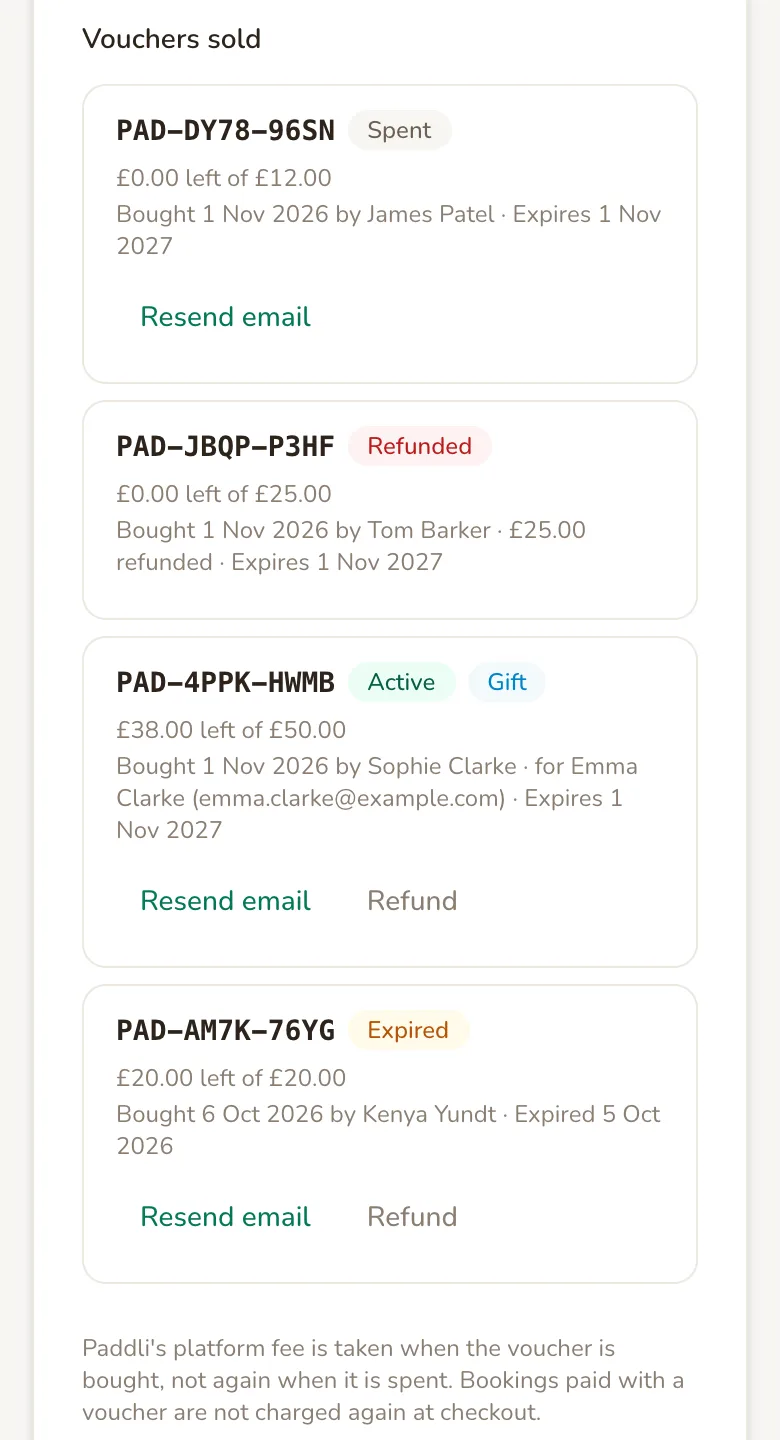
- Active means it has a balance and can still be spent.
- Spent means the balance has all been used on bookings.
- Expired means its use-by date has passed. Whatever was left on it can no longer be spent.
- Refunded means the balance has run out and some or all of it was refunded to the buyer.
- Gift appears next to the status when it was bought for someone else.
A voucher that has been partly refunded but still has a balance stays Active, and its line shows how much was refunded. Vouchers whose payment did not go through are not listed.
Resend email sends the voucher email again, to the recipient for a gift, and the button changes to Sent. You can resend each voucher up to three times an hour.
There are no totals, search or export for vouchers yet.
In your bookings, an order paid with a voucher shows Paid by voucher with the code and amount, and a Charged to card line for what the customer paid by card.
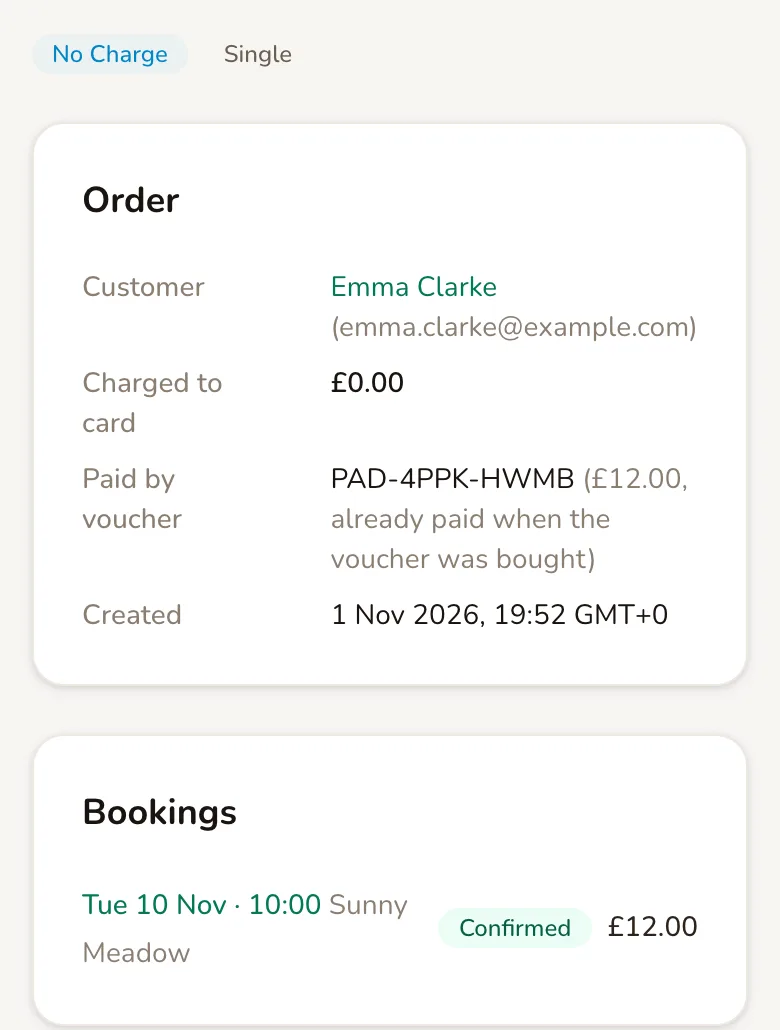
The voucher purchase itself shows in the buyer’s payment history on their customer page.
Refund a voucher
Section titled “Refund a voucher”If a customer asks for their money back, tap Refund next to the voucher. The button only shows while the voucher has a balance left, including after it has expired.
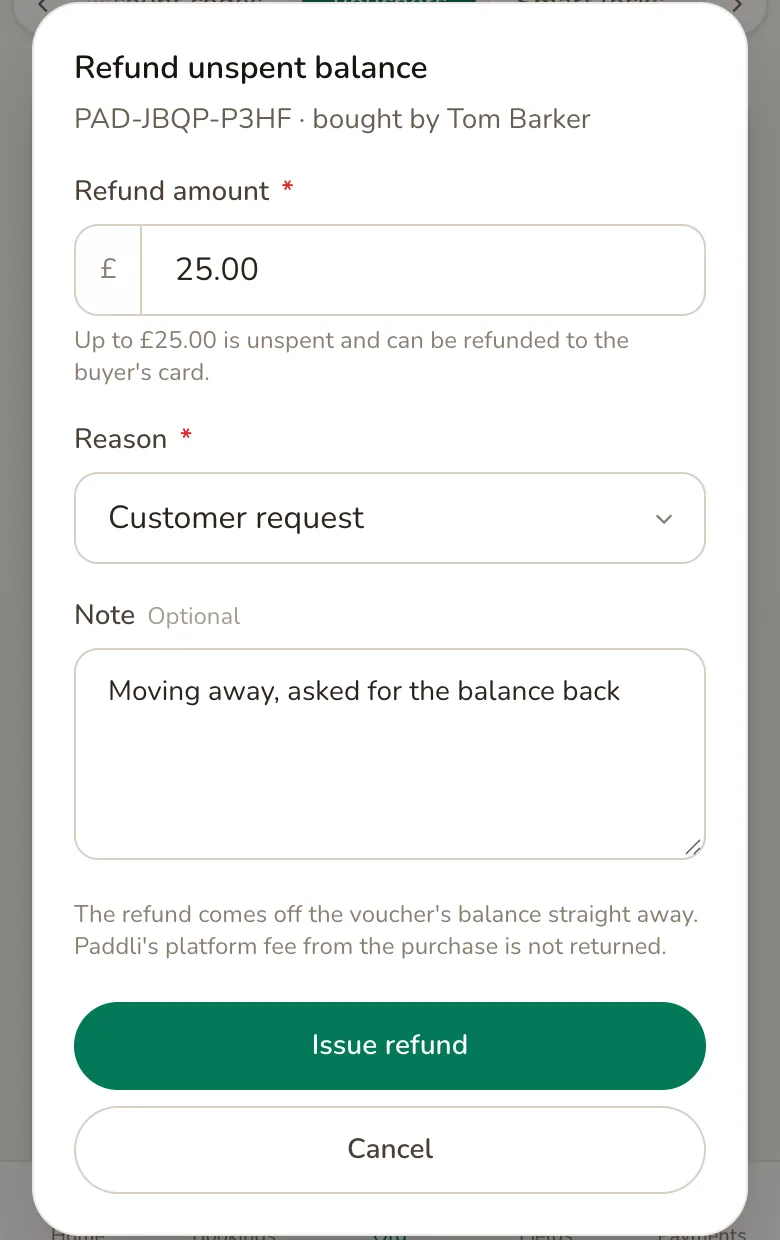
Refund amount starts at everything left on the voucher. Lower it for a partial refund. Choose a Reason, add an optional Note for your own records, and tap Issue refund.
The amount comes off the voucher’s balance straight away and goes back to the card the buyer paid with. Paddli’s fee from the purchase is not returned. Money already spent on bookings cannot be refunded from here.
Cancellations and refunds of bookings paid with a voucher
Section titled “Cancellations and refunds of bookings paid with a voucher”When a booking paid with a voucher is cancelled with a refund, whether by you or by the customer, the voucher’s share goes back onto the voucher and any card share is refunded to the card. The customer’s cancellation email tells them the voucher amount is back on its balance. The expiry date does not change, so money returned to a voucher that has already expired cannot be spent.
Refunding part of a booking from its order page with Issue refund, without cancelling it, only refunds what was paid by card. To give back the voucher’s share, cancel the booking.
Change, pause or stop selling vouchers
Section titled “Change, pause or stop selling vouchers”You can change the purchase options at any time. Vouchers already sold keep their amount and expiry date.
To stop selling, switch Sell vouchers off. Your Gift vouchers page and the links to it disappear, and the balances on vouchers already sold are kept. Customers cannot redeem vouchers at checkout while it is off, either, so if you want to keep honouring vouchers you have sold, leave it on.
You cannot cancel, delete or edit an individual voucher, or extend its expiry date. Not yet. To give back the money instead, refund it.
What vouchers cannot do yet
Section titled “What vouchers cannot do yet”- Issue a free voucher. Not yet. Vouchers are only created when a customer buys one. To give someone money off, create a discount code with a usage limit of 1.
- Weekly subscriptions. A voucher cannot be used to pay for a weekly subscription, and the customer sees Vouchers can’t be used for weekly subscriptions.
- Events. Not yet. Event bookings have no voucher box.
- Manual bookings. Bookings you add yourself are paid outside Paddli, so a voucher cannot be applied to them.
- Choose a delivery date. Not yet. The voucher is emailed as soon as it is paid for.
Ideas for using vouchers
Section titled “Ideas for using vouchers”- Christmas and birthdays. Share your Gift vouchers page on social media and in your local dog groups in the run-up to December.
- Bundle a month of visits. Set a preset amount that matches four of your most popular sessions, so regulars can buy a month up front.
- Dog walkers and trainers. A local trainer can buy a voucher for each new client as a welcome gift, and each client spends it with you.
Related
Section titled “Related”- Discount codes come off the price before the voucher pays. Volume discounts come off first of all.
- Extras and extra dogs are part of the price, so a voucher pays for them too.
- Booking several sessions at once works with a voucher. The voucher’s share is split across the sessions, so cancelling one returns only that session’s share.
- Stripe must be connected before customers can buy vouchers. Redeeming a voucher you have already sold does not need it.
Frequently asked questions
When do I get paid for a gift voucher?
When the voucher is bought. The customer pays by card into your Stripe account straight away, and Paddli's 5% fee is taken from that payment. When the voucher is later spent on a booking, the voucher's share of the booking is not charged again and no second Paddli fee is taken on it.
What happens to a voucher if the booking it paid for is cancelled?
The amount the voucher paid for that booking goes back onto the voucher, ready for the customer's next booking. Any part they paid by card is refunded to their card as normal. The voucher's expiry date does not change.
Can I refund a gift voucher?
Yes, the unspent part. Tap Refund next to the voucher on your Vouchers page, choose how much and a reason, and the money goes back to the card the buyer paid with. Paddli's fee from the purchase is not returned, and anything already spent on bookings cannot be refunded this way.
Can a customer use a voucher and a discount code together?
Yes. The discount code comes off the price first, then the voucher pays what is left. Only one voucher can be used per checkout.
What if the voucher does not cover the whole booking?
The voucher pays what it can and the customer pays the rest by card at checkout. If the voucher covers the whole booking, the customer books without entering any card details and the rest of the balance stays on the voucher.
How long do gift vouchers last?
You choose, from 1 to 60 months, with 12 months as the starting point. Each voucher's expiry date is set when it is bought, so changing the setting only affects vouchers bought afterwards. Once a voucher expires it cannot be spent, though you can still refund any balance left on it.
Can I give someone a free voucher or change a voucher's balance?
Not yet. Vouchers can only be created when a customer buys one, and you cannot edit an individual voucher's balance or expiry date. To give someone money off, create a discount code with a usage limit of 1 instead.
What happens to vouchers people have already bought if I stop selling them?
Their balances are kept, but switching Sell vouchers off also stops anyone redeeming a voucher at checkout. If you want to stop new sales and still honour vouchers you have sold, leave the switch on until they have been used or have expired.