Weekly bookings and subscriptions
Let regular customers keep the same slot every week. They pay for the first session when they book, then Paddli charges them two days before each session until they cancel.
A weekly subscription lets a customer keep the same slot, such as Wednesday at 09:00, every week.
They pay for the first session when they book, then Paddli takes a payment two days before each session until they cancel.
It suits your regulars: their time is held for them, and you do not have to chase them to rebook.
Turn weekly bookings on for a field
Section titled “Turn weekly bookings on for a field”Go to Fields, open the field, and tap the Booking setup tab. Scroll to Checkout Modes & Promotions and tap Edit.
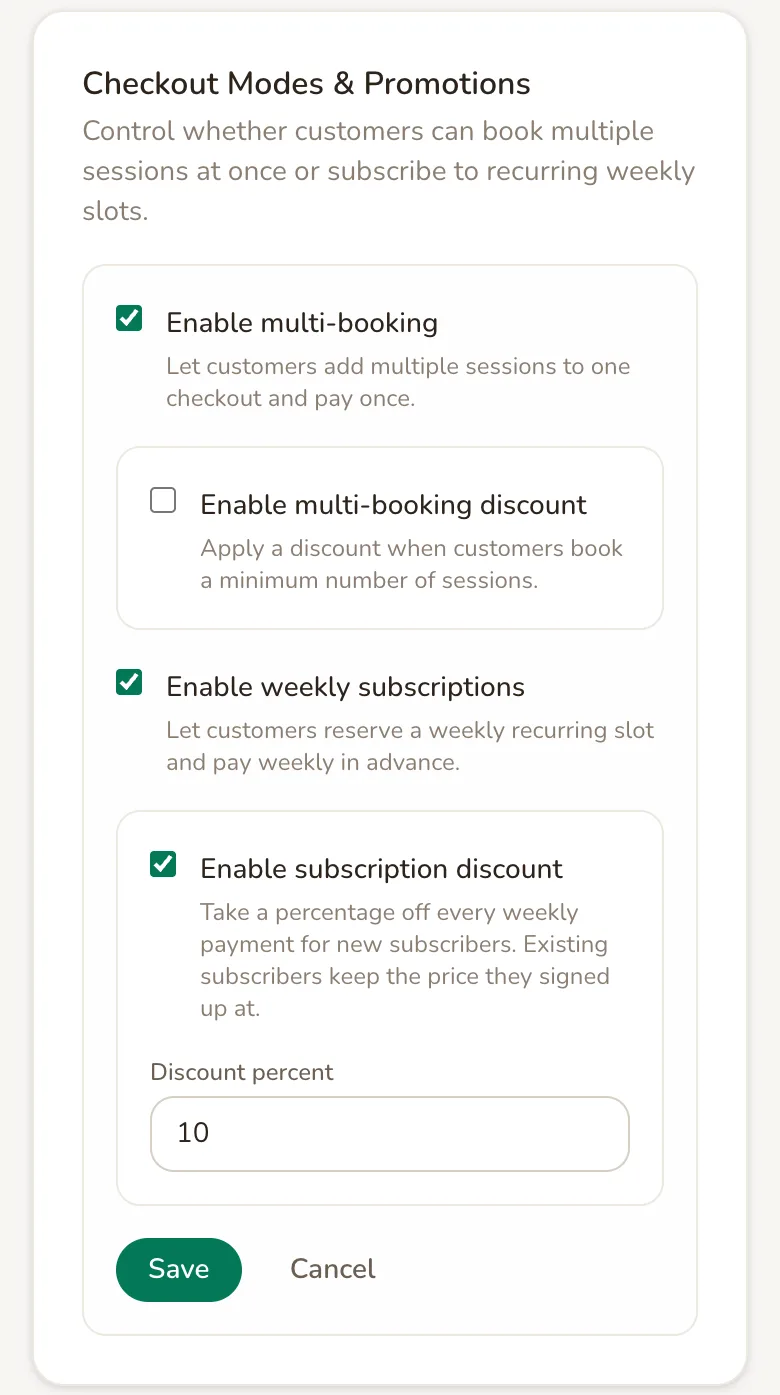
Enable weekly subscriptions lets customers reserve a weekly recurring slot and pay weekly in advance. New fields start with it switched on, so check it on every field you have.
Enable subscription discount takes a percentage off every weekly payment. Enter a Discount percent from 1 to 99. It comes off the session price, extras and extra dogs together, before any discount code.
Tap Save. Changes only apply to customers who subscribe from then on. Existing subscribers keep the price they signed up at, and switching weekly subscriptions off does not end subscriptions that have already started.
Subscribers pay by card through Stripe, so your Stripe account must be connected before anyone can subscribe.
Which slots customers can book weekly
Section titled “Which slots customers can book weekly”Customers can subscribe to any private slot on your booking page, as long as the same day and time is free every week as far ahead as your Forward booking limit (91 days unless you have changed it). If another booking, a subscription, an event or a change to your opening hours gets in the way of one of those weeks, the customer sees a message saying which date is the problem and can still book the slot as a single session.
Weekly bookings are not offered for group sessions, and they cannot be combined with booking several sessions in one checkout.
What customers see when they subscribe
Section titled “What customers see when they subscribe”When a customer picks a slot, a Subscribe to this slot switch appears under their session details, with Repeat every week, save 10%, cancel anytime if you offer a subscription discount.
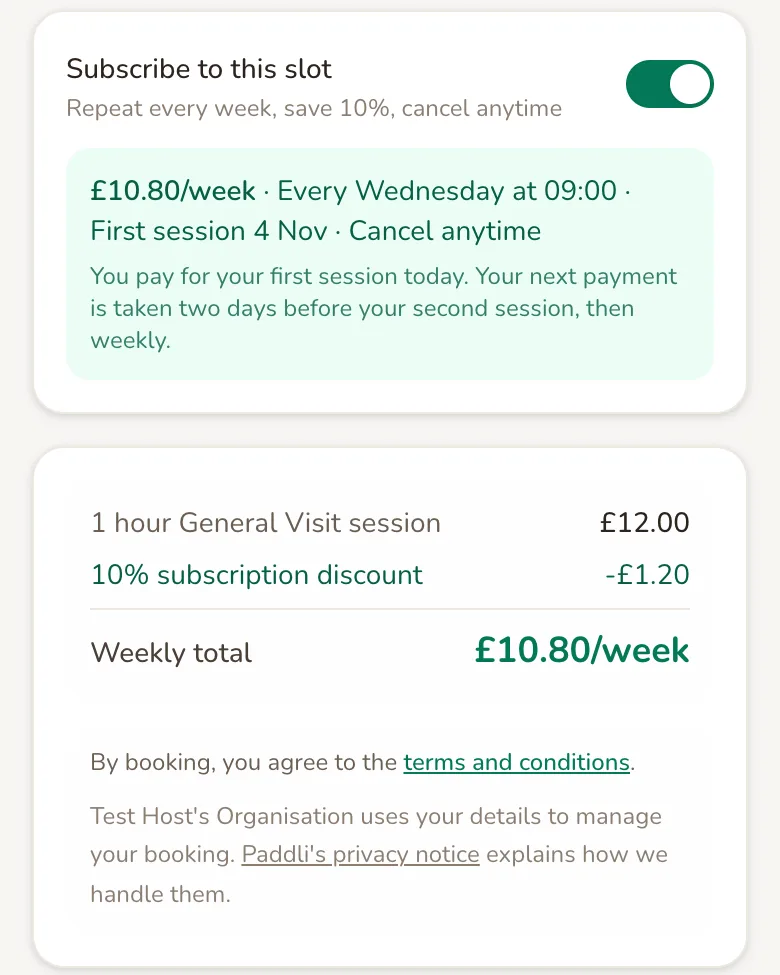
With the switch on, the customer sees the weekly price, the day and time, and the date of their first session. It also tells them: “You pay for your first session today. Your next payment is taken two days before your second session, then weekly.” The pay button reads Continue to payment with the weekly price.
The first payment is the full weekly price for the first session. If the slot they picked has already started today, their first session is the same time next week. Apple Pay and Google Pay are not offered for subscriptions, so customers pay by card.
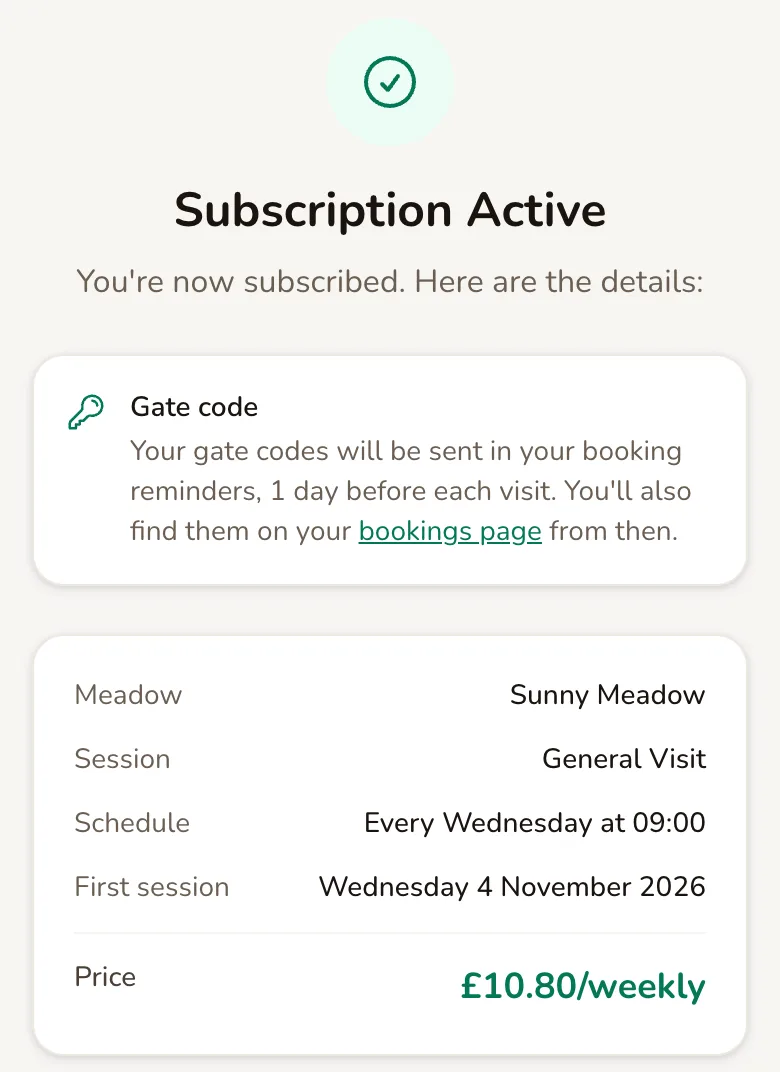
Once they have paid, the customer sees Subscription Active with their schedule, first session and weekly price, and gets a Subscription Confirmed email.
You get a New Subscriber email with a View subscription button. You can switch this email off under Org, then Notifications.
How weekly payments work
Section titled “How weekly payments work”Paddli charges each subscriber two days before every session, using the card they paid with. A session only becomes a confirmed booking once its payment goes through.
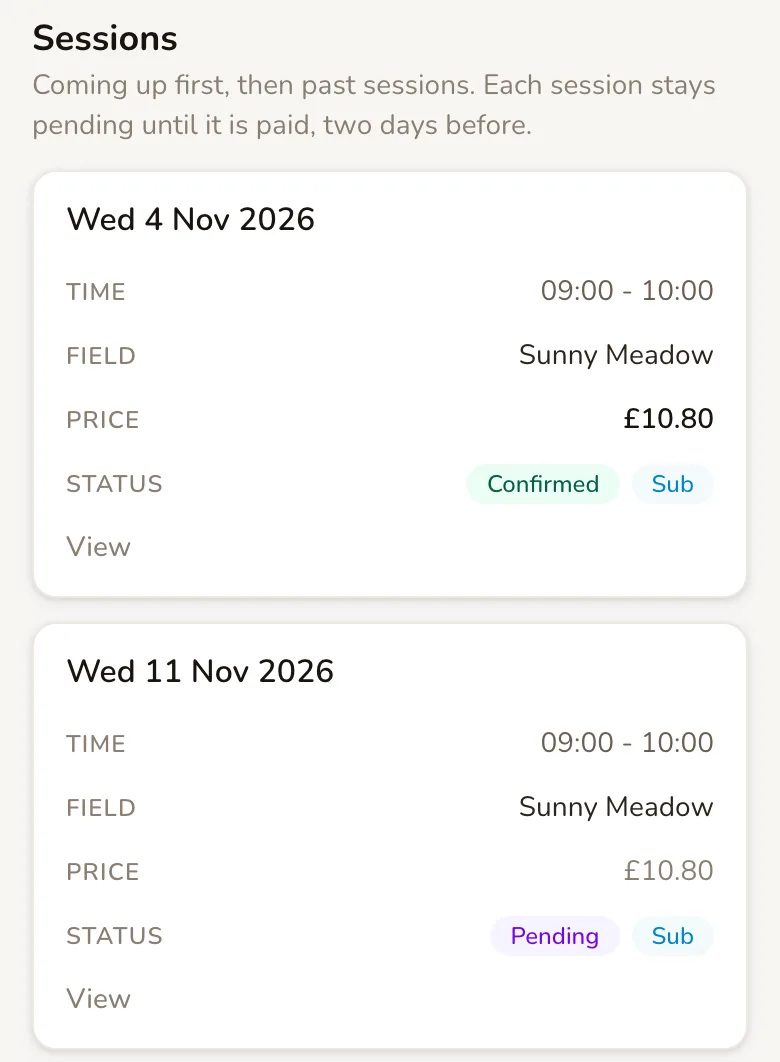
Until then, the coming weeks show as Pending in your Bookings list and calendar, so the slot is held but not yet paid. Paid sessions show a Sub label and work like any other booking: the customer gets their usual reminder, and if you use a smart lock or gate code, each visit gets its own code.
Paddli’s 5% fee is taken from each weekly payment. When you offer a subscription discount, the fee is worked out on the discounted price.
Find your subscribers
Section titled “Find your subscribers”Tap Bookings, then the Subscriptions card. You can also get there from Active subscriptions on your dashboard.
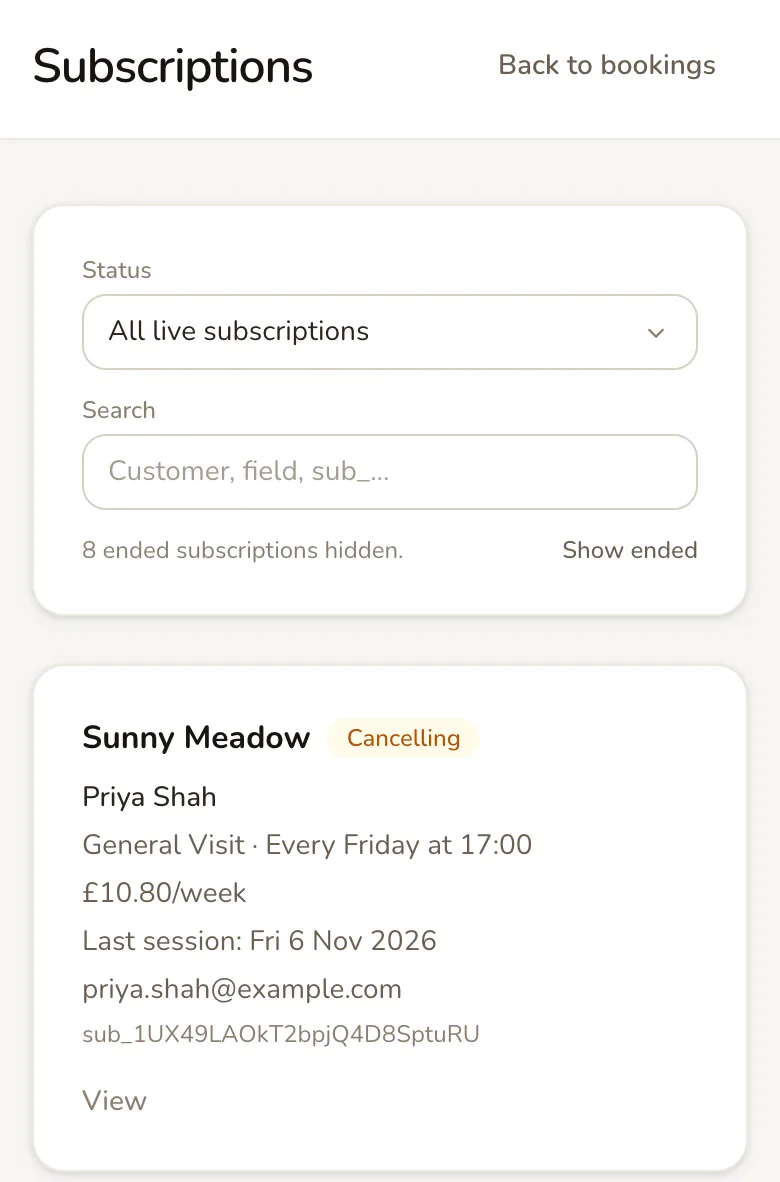
Each subscription shows the field, the customer, their day and time, the weekly price and their next session. Use Status to filter, or search by customer, field or the Stripe subscription ID. Ended subscriptions are hidden until you tap Show ended.
- Active means payments are up to date and the subscription continues.
- Cancelling means it has been cancelled, and the card shows the Last session.
- Ending means your opening hours no longer offer that time, so it ends after its last session.
- Past Due means a payment has failed and Stripe is retrying it.
- Paused means the retries have failed too, and the slot is being held for 7 days.
- Ended and Cancelled subscriptions take no more payments.
Tap View to open a subscription.
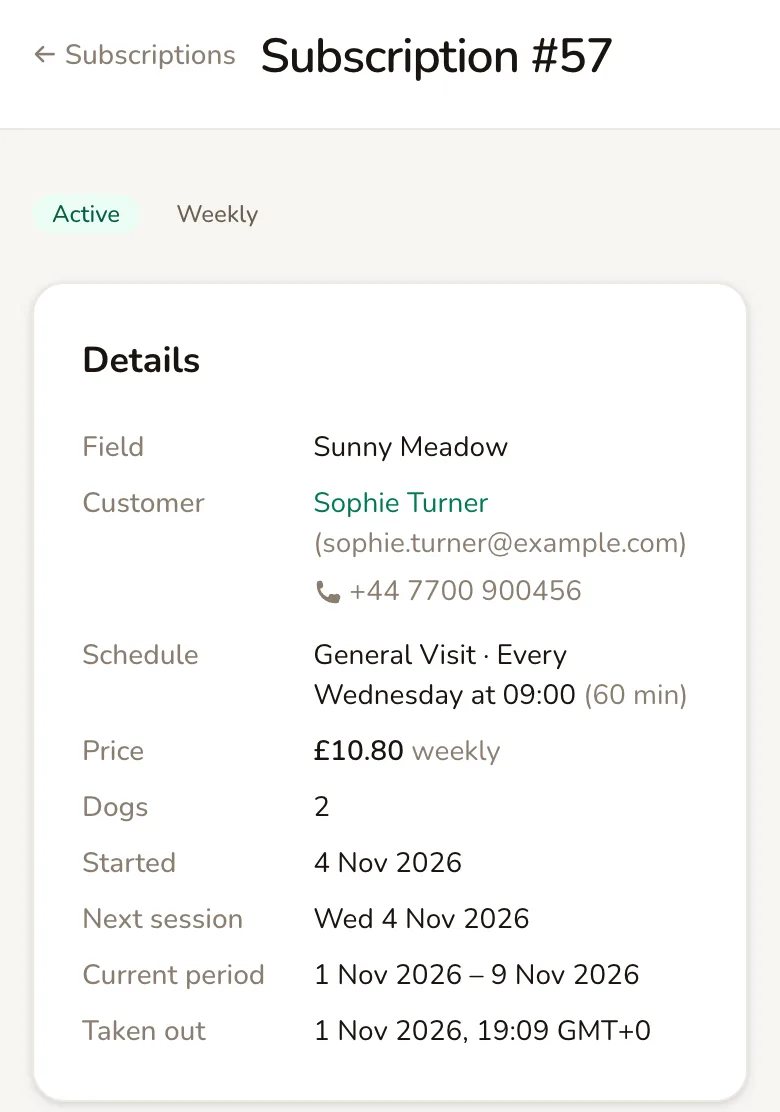
Details shows the customer, schedule, price and number of dogs. Sessions lists every week coming up, then past ones.
Further down, Payments lists each weekly payment, with View in Stripe for the card details and fees, and anything the customer agreed to at checkout.
Skip, waive or cancel
Section titled “Skip, waive or cancel”The Actions at the bottom of a subscription, and the buttons on each card in the list, let you change what happens next. You cannot change a subscriber’s day, time, price or number of dogs. Not yet: to move them to a new time, cancel their subscription and ask them to subscribe again.
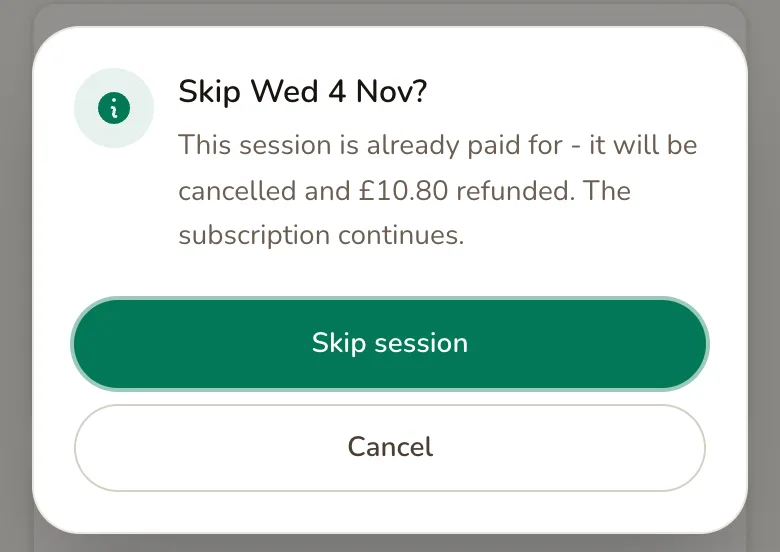
Skip next session skips only the coming week. If that week has not been charged yet, the customer is not charged for it. If it is already paid for, the session is cancelled and refunded in full. The subscription carries on as normal the week after, and Undo skip brings the week back if it has not been charged yet.
Waive unpaid session appears only when a payment has failed. The customer is not charged for that week, its time goes back on sale, and next week is charged as normal.
Cancel subscription stops all future payments. There is no automatic refund: the customer keeps any session they have already paid for, and it still goes ahead. Their subscription shows as Cancelling until that last session, then Ended. You and the customer both get a Subscription Cancelled email.
To cancel a single paid session and refund it, open the session from Sessions and tap Cancel session. The subscription continues.
What subscribers can do themselves
Section titled “What subscribers can do themselves”Subscribers manage their subscription from the link in their emails, or from Manage my booking at the bottom of your booking page.
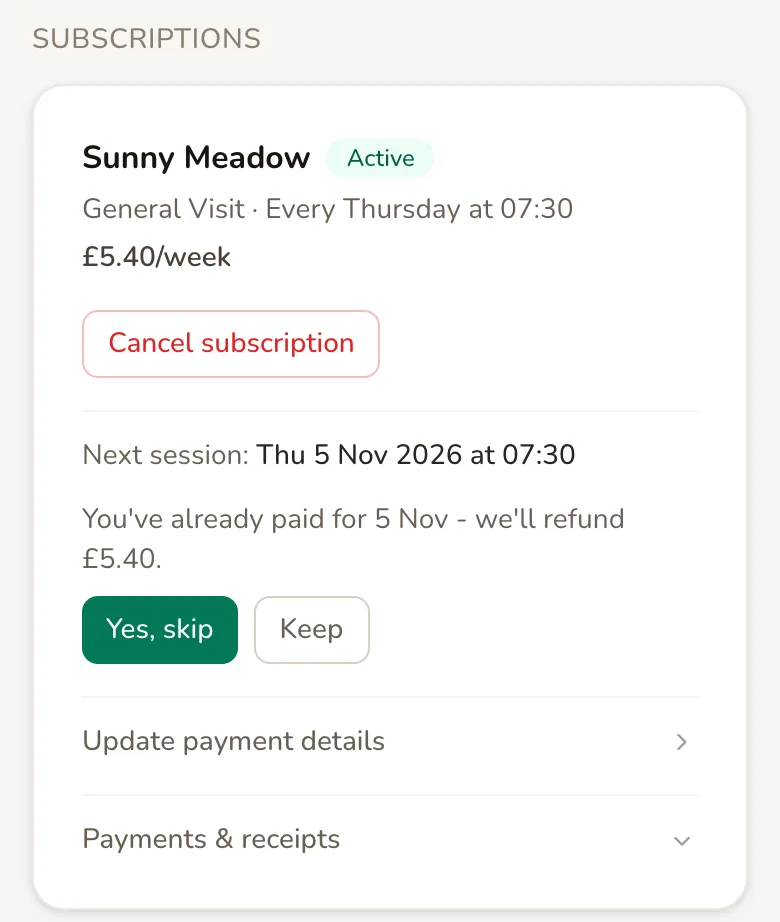
- Cancel subscription stops future payments. They keep any session already paid for.
- Skip next session works like your skip: unpaid weeks are not charged, and paid weeks are refunded in full.
- Update payment details lets them change the card their payments come from.
- Payments & receipts lists each payment, with a button to email a receipt.
Customers can only skip when Subscribers can skip a session online is on, on the field’s Details page under Cancellations and Changes. It is on for new fields, and it works even if you do not let customers cancel bookings online. Your Notice period applies, so with a 24 hour notice period, customers cannot skip a session that starts within 24 hours.
Subscribers cannot change their day or time online.
When a payment fails
Section titled “When a payment fails”If a weekly payment fails, that week’s session is not booked and the subscription shows Past Due. The customer is emailed straight away with a button to update their card, and Stripe tries the payment again automatically over the next few days.
If the retries fail too, the subscription becomes Paused. You get a Payment Failed email, and the customer is told their slot is held for 7 days. If they update their card and pay within that time, the subscription carries on. If not, it ends: the slot goes back on sale, and you and the customer are both emailed.
If you would rather let the week go and keep the subscription, tap Waive unpaid session.
Price, hours and closures
Section titled “Price, hours and closures”Price changes never reach existing subscribers. Their price, extras, extra dogs and any discount are fixed when they subscribe.
Opening hours changes are checked against every subscription before they save. If a change would take away a subscriber’s time straight away, Paddli stops you and names them. If it only bites later in the year, it shows who it affects and their last session, and their subscription ends after that session if you go ahead. Opening hours explains this in full.
Closing a date with a date override skips that week for every subscriber due that day, and they are not charged for it. They are emailed about two weeks before. A session that was already paid for before you closed the day is not cancelled for you, so cancel it from its booking page if it cannot go ahead.
Removing a session type is blocked while customers hold subscriptions for it. Cancel those subscriptions first.
Ideas for using weekly bookings
Section titled “Ideas for using weekly bookings”- Reward your regulars. A 10% subscription discount turns a customer who books most weeks into one who is booked every week.
- Fill quiet times. Weekday mornings that rarely sell out are a good fit for subscribers who want the same time each week.
- Plan for holidays. Close dates in advance with date overrides, and subscribers are told and not charged for those weeks.
Related
Section titled “Related”- Discount codes only work for subscriptions when you tick Also valid for weekly subscriptions on the code. The code then comes off every weekly payment, after the subscription discount.
- Gift vouchers cannot be used for weekly subscriptions.
- Manual bookings cannot start a subscription. Not yet: send the customer your booking link instead.
- Account customers cannot put a weekly subscription on their account.
- Customer documents and dog details are asked for once, when the customer subscribes, and Paddli reminds them if anything is missing.
Frequently asked questions
When are my weekly customers charged?
A subscriber pays for their first session when they book. After that, Paddli charges their card two days before each session, every week, until the subscription is cancelled. A session only becomes a confirmed booking once its payment goes through, so until then it shows as Pending in your bookings.
If I put my prices up, do existing subscribers pay more?
No. Each subscriber keeps the price they signed up at, including any subscription discount, extras and extra dogs. New prices and discount changes only apply to customers who subscribe after you make them. To move an existing subscriber to a new price, they would need to cancel and subscribe again.
What happens if a subscriber's card payment fails?
That week's session is not booked, and the customer is emailed straight away with a link to update their card. Stripe retries the payment automatically over the next few days. If the retries also fail, Paddli emails you and the customer, holds their slot for 7 more days, and ends the subscription if it is still unpaid after that.
Can I set up a weekly booking for a customer myself?
Not yet. Only customers can start a subscription, from your booking page. Send them your booking link and ask them to switch on Subscribe to this slot at checkout. You can still add one-off bookings for them yourself.
If I cancel a subscription, does the customer get a refund?
No refund is taken automatically. Cancelling stops all future charges, and the customer keeps any session they have already paid for, which still goes ahead. If you want to cancel and refund a session that is already paid, open that session's booking and use Cancel session, which refunds that week.
Can a subscriber skip a week?
Yes, if you allow it. Subscribers can skip their next session from their Manage page when Subscribers can skip a session online is on for the field. A week that has not been charged yet is never charged, and a week already paid for is refunded in full. You can skip a subscriber's next session yourself at any time.
Can subscribers use a gift voucher or a discount code?
Vouchers cannot be used for weekly subscriptions. Discount codes can, but only codes you have marked as Also valid for weekly subscriptions, and the discount then comes off every weekly payment for as long as the subscription runs.
What happens to subscribers when I close my field for a day?
If you close a date with a date override, any subscriber due on that day has that week skipped automatically and is not charged for it. They are emailed about two weeks before. A session that was already paid for before you closed the day is not cancelled for you, so cancel it from its booking page if it cannot go ahead.